


AI in Google Sheet with ChatGpt
How can AI be used in the day-to-day work of a professional in the Office environment?
Through GPT technology, a language model developed by OpenAI, currently based on the GPT-3 architecture. We will learn how to use ChatGPT in Google Spreadsheets to automate repetitive tasks and streamline workflow.
How can we install ChatPGT on Google Sheet?
- We open Google Sheet, load the file and once it is loaded, we go to the top menu and select the option Extensions - Add-ons - Add-on download.
- Once we have accessed the option of Download add-ons will open up for us Google Workspace Marketplace we select GPT for Google Sheets. Once the add-on is downloaded, a management box will be enabled on our google sheet page at the top left under the name: GPT for Sheets ¨and Docs¨.
- To activate this add-on, we have to go back to the top menu and select the option Extensions - GPT for Sheets and Docs - Set API key
- It takes us directly to the API keys in which we must associate a name, which can be the name of the file we are creating or any other. It will show us a message indicating that we have to copy the pin.
- Once the name has been associated and the pin has been copied within the API keysreturns us once again to Google Sheet where we have to copy in the complement that was enabled, and once we introduce the password.
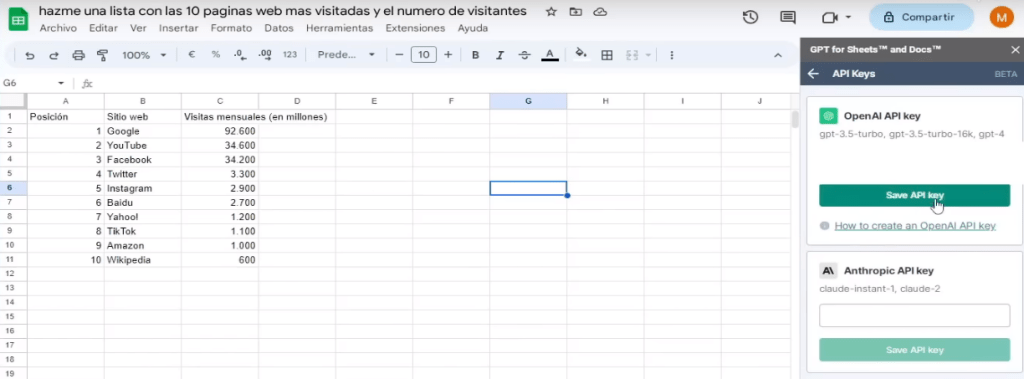
Once we have connected GPT for Sheet via Open API key, we go to our spreadsheet and start to work.
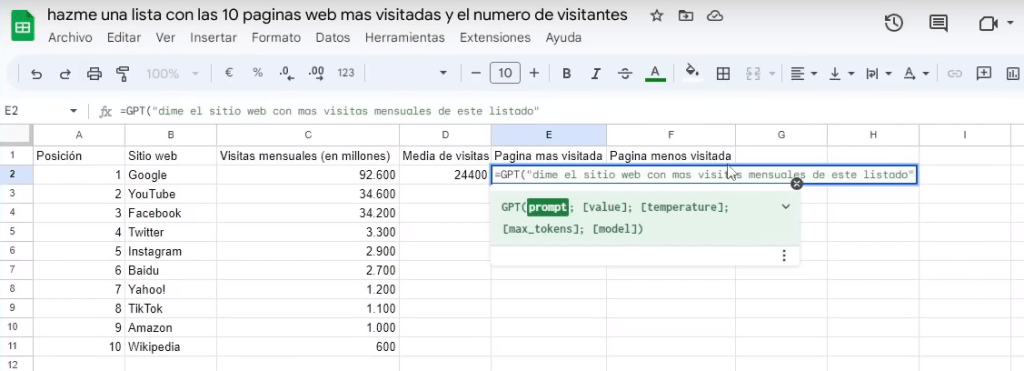
Create the results of the first cell and drag it to cell 11, and it will give us all the calculations for each of the cells.


 English (UK)
  Español